6.3.2 SFC Language Syntax
6.3.2.1 SFC basic command table
| Serial number | Command | Description |
|---|---|---|
| 1 |  | Nested closed |
| 2 |  | End of sequencer |
| 3 |  | Open parallel branch |
| 4 |  | Open the selected branch |
| 5 |  | Steps and transition conditions |
Serial branch:
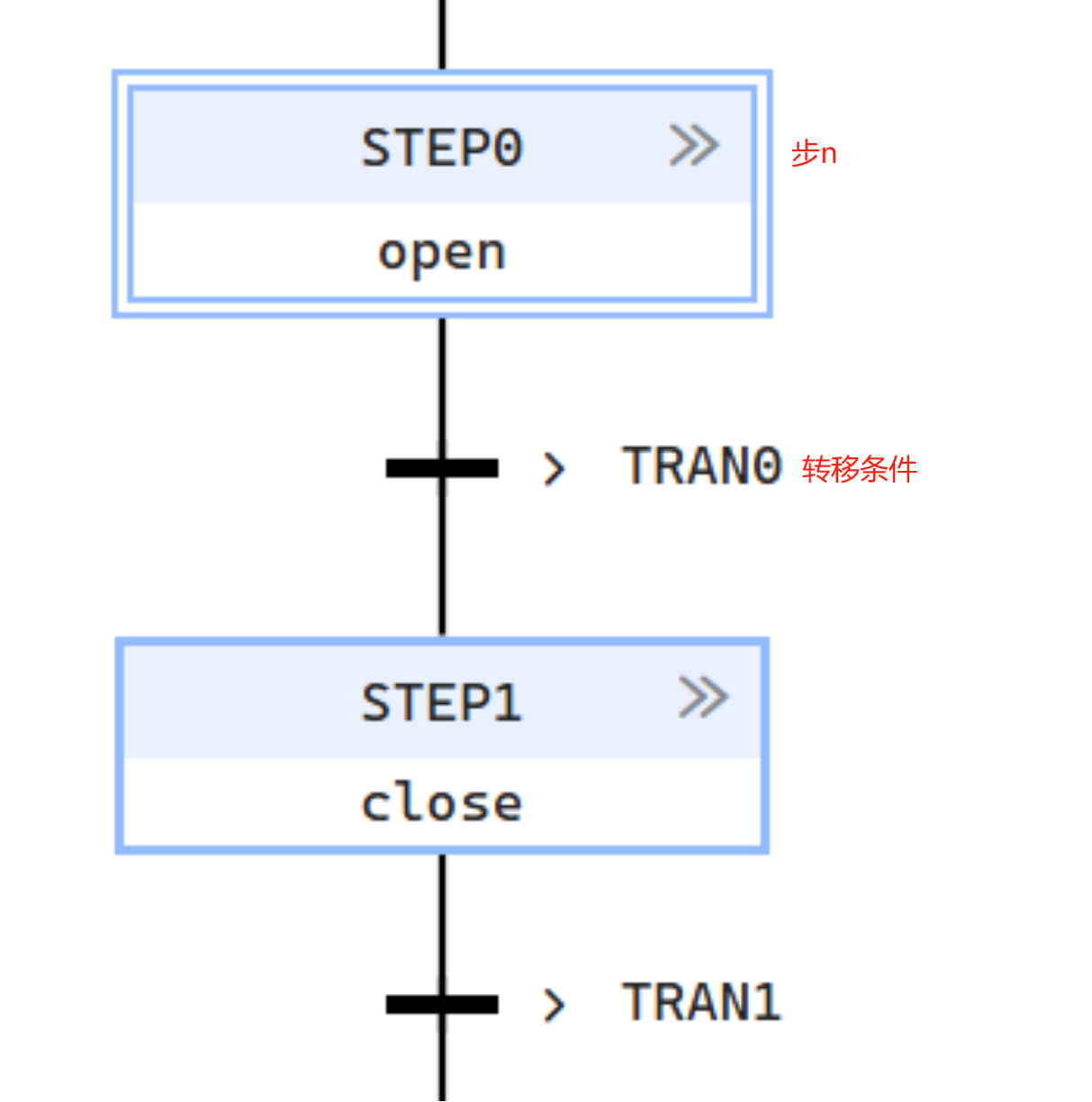
The method of transferring to the next step of serial connection execution processing when the transfer condition is established is as shown in the figure below:
- When executing the action output of step n, if the transition condition is established, the action of step n will be non-executed and step n+1 will be executed.
Select branch:
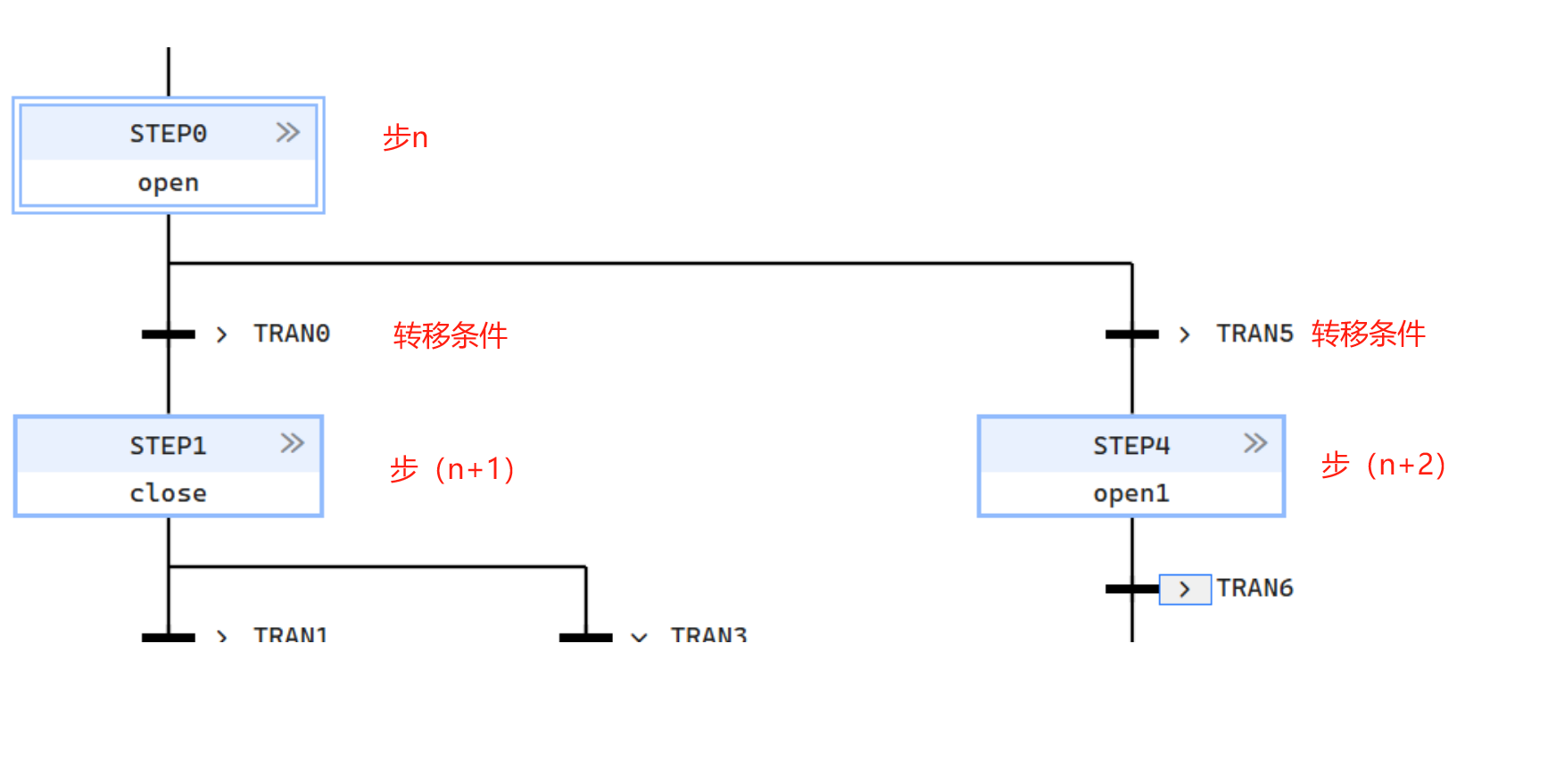
Among multiple steps connected in parallel, only the step with the first established transition condition is executed, as shown in the following figure:
- When executing the action output of step n, select the step with the first established condition among transfer conditions 1 or 2, and execute the related actions of changing the step.
- When the transfer conditions are met at the same time, the transfer condition on the left takes precedence. Perform non-execution processing on the action output of step n
- After selection, execute each step of the selected columns in sequence until merged
Parallel branch:
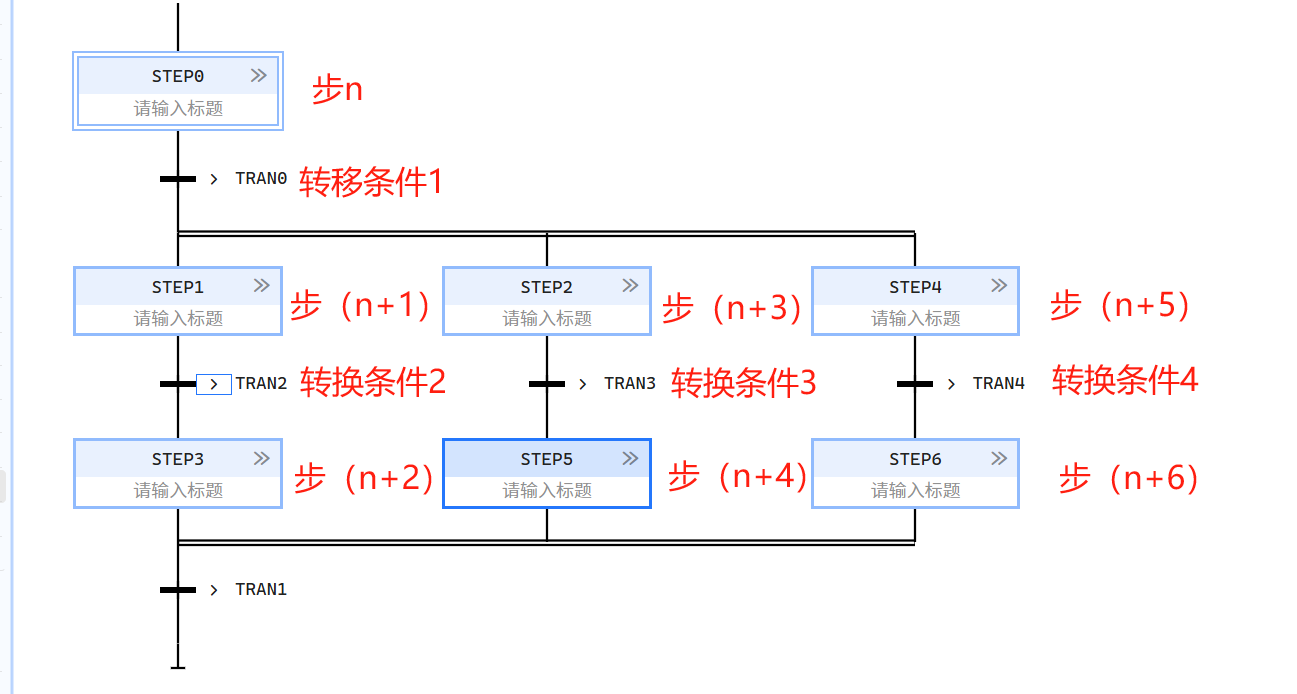
Multiple steps of parallel connections are executed at the same time when the transfer condition is established, as shown in the following figure:
- When executing the action output of step n, if the transition condition 1 is established, the action output of step (n+1), the action output of step (n+3), and the action output of step (n+5) are simultaneously executed.
- When transfer condition 2 is established, transfer to step (n+2), when transfer condition 3 is established, transfer to step (n+4), when transfer condition 4 is established, transfer to step (n+6)
- Parallel branches and parallel aggregations must correspond one to one.
- Only one branch in the selected branch structure can be activated. Branch jumps are prioritized from left to right or selected based on priority.
- Selective branching and selective aggregation must correspond one to one.
- Selection branches must end in the same selection aggregate.
- In the link of SFC elements, the mutual replacement of step/transformation and conversion/step is always maintained, that is:
- Two steps should never be linked directly, they are always separated by a transition
- Two transformations should never be linked directly, they are always separated by a step
6.3.2.2 Steps
A step represents a situation in which the behavioural characteristics of a program organizational unit with respect to its inputs and outputs are subject to a set of rules defined by the relevant operations of the step. A step is either active or inactive. At any given moment, the state of a program organization unit is defined by the setting of some active steps and the values of their internal and output variables.
- Steps can only be connected to transformations, parallel branches or selective branch aggregation.
- Steps can only be followed by transformations, alternative branches or parallel branch aggregation.
- There are two types of steps: initial step and normal step. The initial step is active when the program is started, and then the program will be executed in sequence according to the changes in conversion conditions.
Step flag (active or inactive status of step)
- The step flag can be represented by the logical value of the Boolean structure element ** . X , where "**" is the step name, and this Boolean variable has a value of 1 when the corresponding step is active and 0 when the corresponding step is inactive The state of this variable is available for the graphical links on the right side of the step shown in table 54.
- The time elapsed from the start of a step ***.T can be represented by a structure element of type TIME. When a step is de-activated, the value of the time elapsed by the step shall remain at the value it had when the step was de-activated. When the step is activated, the value of the step elapsed time shall be reset to zero.
-
Variables such as step name, step flag and step time are local static variables to the FB where these steps are located.
-
The maximum number of steps per SFC and the accuracy of step elapsed times are implementation dependent.
-
It should be an error if:
- A SFC network does not contain exactly an initial step;
- The user program attempts to assign a value directly to the step status or step time.
6.3.2.3 Transition conditions
Transition conditions represent conditions that control the transition from one or more predecessor steps to one or more successor steps along corresponding directed connections. A transition is represented by a horizontal line across a vertical directed line.
Conversion conditions:
- Control the conditions for transferring from one step to other steps;
- When the conversion condition is met, the immediately preceding step changes from the active state to the inactive state;
- Transition conditions are tested only when the states of all immediately preceding steps are active;
- The conversion condition is defined by a variable or an expression
- The conversion above can only connect steps, select branches, and parallel branch aggregation;
- The conversion can only be followed by steps, parallel branches, selective aggregation, or jump branches.
6.3.2.4 Actions
An operation is a description of a manipulation performed on a system variable. There can be 0 or more operations in a step. There are various types of operations, and the type of operation is described by an operation qualifier. An operation can be a change of a boolean variable or a call to a subroutine. An operation block contains an operation together with the conditions for its execution (called operation qualifiers) The system monitors the conditions for the execution of all the action blocks of a step during the activation and de-activation of the step.
- The operation is composed of a Boolean variable, a set of statements in the ST language, and a set of rungs in the LD language.
- It is an error if the value of a Boolean variable that is the name of an operation is modified in any way other than as the name of one or more operations of the same SFC.
Steps and operations
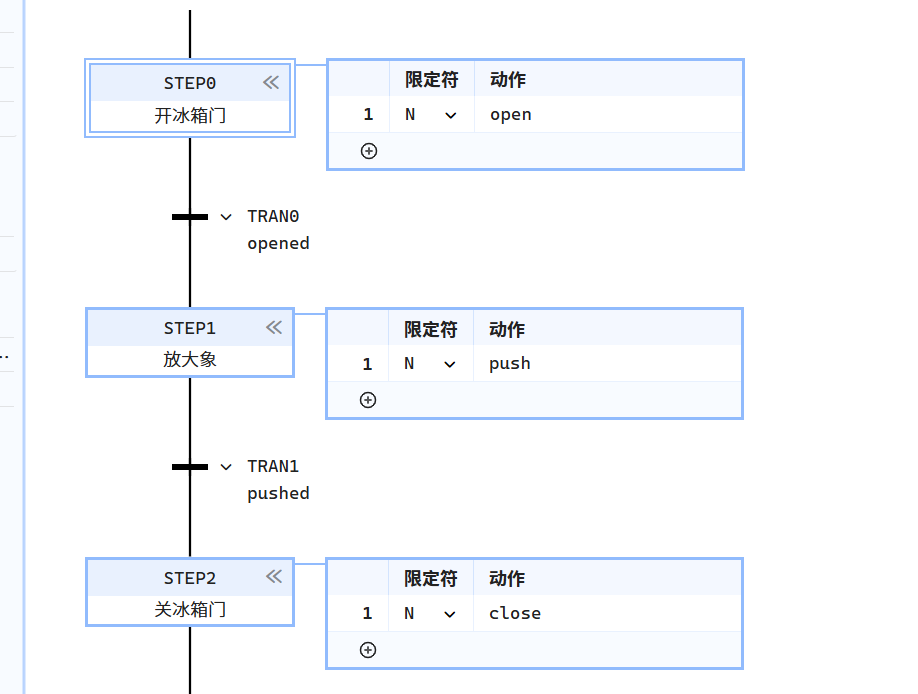
A programmable controller that supports SFC elements implements one or more mechanisms defined in the figure below for the association of operations with steps. The maximum number of operation blocks per step is implementation dependent.
Operation block
The action block shown above as action_block is a graphical element used to combine a Boolean variable with an operation qualifier to generate an enable condition for the operation in question according to the rules.
- The action_block provides a means of optionally specifying a Boolean “indicator” variable indicated by the “c” field in the table, which can be set by the specified operation to indicate its completion, timeout, error condition, etc.
| Serial number | Description | Operation block |
|---|---|---|
| 1 | "a": Action qualifier "b": Action name "c": Boolean "indicator" variables (deprecated) "d": Action using: | 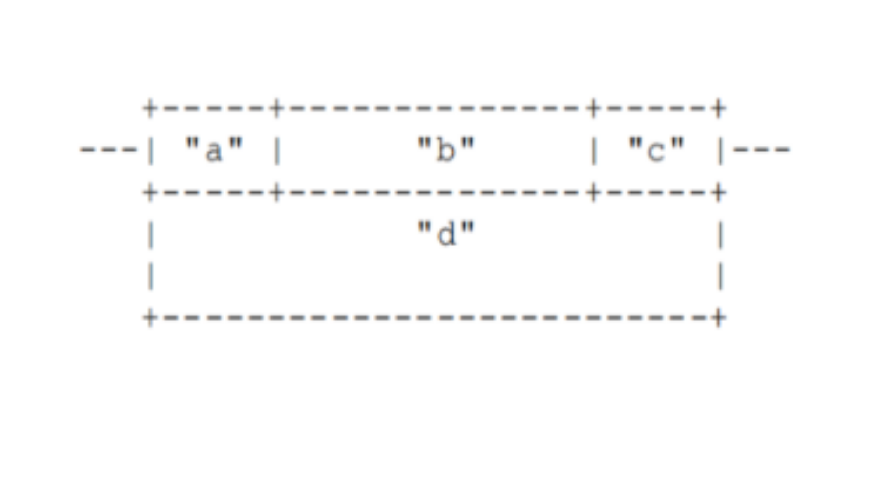 |
- If the "c" field is not present and the "b" field specifies that this operation should be a boolean variable, then the variable shall be interpreted as a "c" variable when required;
- If the "c" field is not defined and the "b" field does not specify a Boolean variable, the value of this "indicator" variable is always FALSE
Operation qualifier
Operations shall be described by one or more of the mechanisms defined herein, and shall be associated with a step by means of a step body of text or a graphical operation block. The control of an operation shall be indicated by an operation qualifier:
- N: The operation is active for the entire activation period of the step and reverts to an inactive state as the step exits the active state.
- S: the operation will remain active after the step is activated, independent of the loss of activation of the step.
- R: The operation will remain in the inactive state after the step is activated. This operation is used to stop other operations that are executing at the current step, e.g., if a step has an S operation that continues to execute after the step exits, you can use the R operation if you want it to stop executing.
6.3.2.5 Execution sequence
-
The execution of the SFC program starts from the initial step of the active sequence. Once a step is activated, the operations in that step are executed immediately. In this context, the interlocking conditions for each operation need to be considered. After all operations have been performed, the first step is to check for monitoring errors. If there are no monitoring errors and the subsequent transition conditions are met. The next step in the sequence will be activated.If there is a monitoring error or the transition conditions are not met, he current step remains active until the error is eliminated or the transition conditions are met. At the end of the SFC program, a jump can be used to activate the loop processing of the sequencer,or the sequence end can be used to terminate the sequencer.
-
The initial state is represented by the initial values of its internal and output variables and the configuration of its initial step (i.e., the step that is initially active). Each SFC network should have exactly one initial step. For system initialization, the default elapsed time for the initial step of all steps is zero. The default initial state of a normal step is FALSE, while the default initial state of an initial step is TRUE. However, when an instance of an SFC function block is declared as retained (RETAIN), the status and elapsed time (if supported) of all steps contained in the function block shall be treated as retained during system initialization.
-
The execution of all instructions in an SFC network is scheduled according to the following algorithm:
- Activate the initial step (only on the first call), otherwise deactivate all steps whose subsequent transition conditions are TRUE, and activate all steps immediately following these transitions.
- Check the output of all motion controls. If a TRUE-FALSE edge has just been detected, the associated action is executed for the last time.
- Execute all operations whose action controls evaluate to TRUE.
- Evaluate the transition conditions and continue looping from step 1.
- There are no explicit endpoints in SFC networks. If there is no subsequent transition, the program will not automatically return to the initial step, and the SFC program will stay at the last active step.