7.11.3 COPY_BLK
Function
The COPY_BLK instruction moves data from one storage area (source range) to another storage area (destination range). You can copy a complete variable or a partial member of an array into another complete variable or a partial member of an array
LD graphics
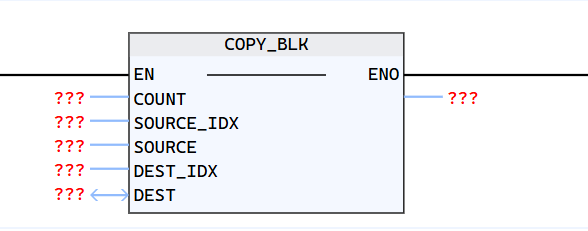
| Interface variable | Declaration | Data type | Description |
|---|---|---|---|
| COUNT | Input | UDINT | The number of source elements to be copied If no array is specified in the source parameter, the user needs to set the value of the actual parameter COUNT to "1"; otherwise the copy fails |
| SOUTCE_IDX | Input | DINT | Determine the starting point of the storage area to be copied: The SOURCE_IDX parameter will be calculated from 0; Corresponds to the first element of the original array If the SOURCE argument is not specified ARRAY or only an element of ARRAY is specified,then the user needs to assign the value of the SOURCE_IDX actual parameter to "0"; otherwise the copy fails |
| SOURCE | Input | ANY_TYPE | Source variable name to be copied |
| DEST_IDX | Input | DINT | Determine the starting point of the target storage area: The DEXT_IDX parameter will be calculated from 0; Corresponds to the first element of the target array; If not specified in the DEST actual parameter Any ARRAY or only an element of ARRAY is specified,then the user needs to assign the value of the DEST_IDX actual parameter to "0"; otherwise the copy fails |
| DEST | IN_OUT | ANY_TYPE | Variable name of the destination area to which the contents of the source block will be copied |
| Function name | Return value | INT | Function execution feedback error message |
warning
- This function supports any type of variables such as STRING and UDT types (ANY_TYPE does not include FB type), and copy of arrays
- Use with caution when the types of variables or array member variables are inconsistent, as data may not be aligned and cause data confusion
- The number of copied elements is not allowed to exceed the selected source range and target range. If the range is exceeded, the data copy will not be performed
Corresponding syntax
- COUNT: Number of copied elements
- SOURCE_IDX: starting point of the total number of copied elements
- DEST_IDX: starting point of target storage area
Return value error code description
| Error code (hexadecimal code) | Description |
|---|---|
| 0000 | COPY completed; the number of copied elements does not exceed the selected source range and target range, and the source and target data types are consistent |
| 0001 | COPY completed; the number of copied elements does not exceed the selected source range and target range, but the source and target data types are inconsistent |
| 8151 | The SOURCE parameter cannot be accessed. Unable to copy |
| 8153 | Error in parameter SOURCE while generating code. Unable to copy |
| 8281 | The value of parameter COUNT is less than or equal to 0. Unable to copy |
| 8282 | The value of parameter COUNT is greater than the number of SOURCE array elements. Unable to copy |
| 8283 | SOURCE is not an array variable, and the value of parameter COUNT is not equal to 1. Unable to copy |
| 8381 | The value of parameter SOURCE_IDX is less than 0. Unable to copy |
| 8382 | The value of parameter SOURCE_IDX exceeds the upper limit of the SOURCE array. Unable to copy |
| 8383 | SOURCE is not an array variable, and the value of parameter SOURCE_IDX is not equal to 0. Unable to copy |
| 8284 | The value of parameter COUNT + the value of parameter SOURCE_IDX is greater than the number of SOURCE array elements. Unable to copy |
| 8481 | The value of parameter DEST_IDX is less than 0. Unable to copy |
| 8482 | The parameter DEST_IDX value exceeds the limit of the DEST array. Unable to copy |
| 8483 | The parameter DEST is not an array variable, and the value of the parameter DEST_IDX is not equal to 0. Unable to copy |
| 8484 | For the data to be copied, the target range of the variable pointed to by the DEST parameter is smaller than the source range to be copied. Unable to copy |
| 8551 | The DEST parameter cannot be accessed. Unable to copy |
| 8552 | An error occurred while generating code for parameter DEST. Unable to copy |
Example
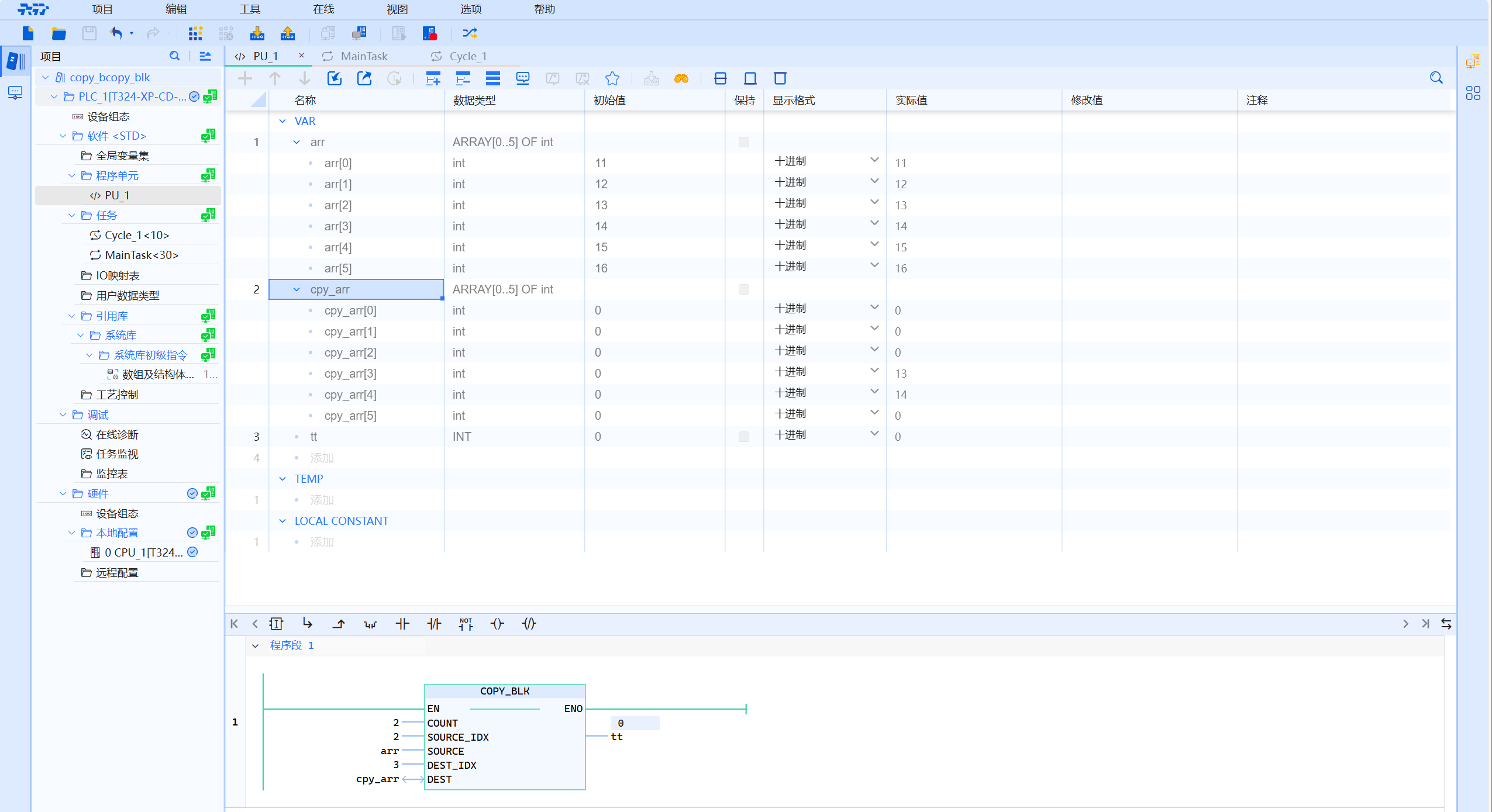
- LD sample pictures are shown below:
- ST example is shown in the following code:
ss:=COPY_BLK(
    COUNT:=1,
    SOURCE_IDX:=sarr[11],
    SOURCE:=sarr,
    DEST_IDX:=darr[3],
    DEST:=darr
);