6.2.2 ST Language syntax
6.2.2.1 ST Language
- ST language operators are shown in the following table:
| Serial number | Operator description | Symbol | Example | Precedence |
|---|---|---|---|---|
| 1 | Brackets | () | (A+B/C) | 1(Highest) |
| 2 | Call a function with return value | Function name (parameter list) | MAX(X,Y) | 2 |
| 3 | Dereference | ^ | R^ | 3 |
| 4 | One dollar off | - | -A | 4 |
| 5 | One dollar plus | + | +A | 4 |
| 6 | Negation (find the complement code) | NOT | NOT C | 4 |
| 7 | Power operation | ** | A**B | 5 |
| 8 | Multiplication | * | A*B | 6 |
| 9 | Division | / | A/B | 6 |
| 10 | Modular operation | MOD | A MOD B | 6 |
| 11 | Addition | + | A+B+C | 7 |
| 12 | Subtraction | - | A-B-C | 7 |
| 13 | Compare sizes | < ≥ | A<B | 8 |
| 14 | Comparison of equality | = | A=B | 8 |
| 15 | Is the comparison unequal | <> | A<>B | 8 |
| 16 | "AND" operation | & AND | A&B A AND B | 9 |
| 17 | "XOR" operation | XOR | A XOR B | 10 |
| 18 | "OR" operation | OR | A OR B | 11 |
Expression
- Expression: The expression will be evaluated during the execution of the program and then return a value. An expression consists of operands (constants, variables, constants, or function calls) and their matching operators (such as *, /, +, or -). Operators allow expressions to be joined together or nested within each other
- The order of operations is the precedence of the relevant operators, the order from left to right, and the parentheses
Arithmetic expression
- An arithmetic expression can be either a numeric value or a combination of two values or expressions with arithmetic operators. Arithmetic expressions can handle various data types supported by the current CPU
The data types supported by arithmetic expressions are shown in the following table:
| Operation | Operator | First operand | Second operand | Result |
|---|---|---|---|---|
| Power operation | ** | Floating point number/integer //Base | Integer/Floating point number //Exponent | Floating point number |
| One dollar plus or one dollar minus | + or - | integer/floating point number TIME/LTIME | - | integer/floating point number TIME/LTIME |
| Multiplication | * | Integer/Floating point number TIME/LTIME | Integer/Floating point number Integer | Integer/Floating point number TIME/LTIME |
| Division | / | Integer/Floating point number TIME/LTIME | Integer/Floating point number (not equal to 0) Integer | Integer/Floating point number TIME/LTIME |
| Modular operation | MOD | Integer | Integer | Integer |
| Addition or subtraction | + or - | integer/floating point TIME LTIME TOD DATE DT LTOD LDATE<br/ >LDT | Integer/Floating point TI ME,DINT(INT,UINT,SINT,USINT) LTIME(TIME),LINT(DINT,UDINT,INT,UINT,SINT,USINT) TIME,DINT(INT,UINT,S INT,USINT) DINT(INT,UINT,SINT,USINT) DINT(INT,UINT,SINT,USINT) LTIME,LINT(DINT,UDINT,INT,UINT ,SINT,USINT) LINT(DINT,UDINT,INT,UINT,SINT,USINT) LTIME,LINT(DINT,UDINT,INT,UINT,SINT,USINT) | Integer/floating point TIME LTIME TOD DATE DT LTOD LDATE LDT |
| Subtraction | - | TOD DATE DT LTOD LDATE LDT | TOD DATE DT<br/ >LTOD LDATE,DATE LDT | TIME DINT DINT LTIME LINT LTINE |
Relational expression
- A relational expression compares the values or data types of two operands and returns a Boolean value. If the comparison is true, the result is TRUE otherwise FALSE
- The data types supported by relational expressions are shown in the following table:
| Operation | Operator | First operand | Second operand | Result |
|---|---|---|---|---|
| Comparison: Equal, not equal | =,<> | Integer/Floating point Bit string String TIME, LTIME Date and time | Integer/Floating point Bit string String TIME, LTIME Date and time | BOOL |
| Comparison: Less than, less than or equal to, greater than, greater than or equal to | <,≤,>,≥ | Integer/floating point number Bit string String TIME, LTIME Date and time | Integer/floating point Bit string String TIME, LTIME Date and time | BOOL |
- When comparing floating-point numbers, specific data patterns for invalid floating-point numbers (NaN) that result in invalid operations (e.g., the square root of -1) are not comparable
- STRING comparison compares UTF-8 encoded characters; WSTRING comparison compares UTF-16 encoded characters. During the comparison process, the length of the variable and the corresponding value of each character will be compared
- Only two time data of the same data type can be compared. The system cannot compare invalid date and time data patterns
- If two variables have the same structured data type, the values of the two structured operands can be compared (T3 supports this operation)
- To compare two variables of ARRAY data type, the operator can only be "=" or "< >". And the following requirements must be met: (T3 supports this operation)
- The data types of the elements must be the same
- The dimensions of the two ARRAYs must be the same
- The number of elements in all dimensions must be the same, but the specific ARRAY limits (starting subscripts) do not need to be the same
- Supports STRUCT arrays, but does not support FB type arrays
- 2 bit string size comparisons, the comparison is the comparison of the size of the bit strings corresponding to positive integer values. The bitstring data type can be compared with positive integers. But comparison with negative numbers is not allowed
Logical expression
- A logical expression consists of two operands and a logical operator (AND, OR, XOR) or negation operand (NOT)
warning
- If both operands are of BOOL data type, the result of the logical expression is also of BOOL data type
- If at least one of the two operands is a bit string, the result is a bit string and the result is determined by the type of the highest operand
- The data types supported by logical expressions are shown in the following table:
| Operation | Operator | First operand | Second operand | Result |
|---|---|---|---|---|
| Negation (reverse code) | NOT | BOOL bit string | - - | BOOL bit string |
| "AND" operation | AND or & | BOOL bit string | BOOL bit string | BOOL bit string |
| "OR" operation | OR | BOOL bit string | BOOL bit string | BOOL bit string |
| "XOR" operation | XOR | BOOL bit string | BOOL bit string | BOOL bit string |
Data type of untyped constant
- Untyped constants follow the implicit conversion of expression data types. When the constant is an integer, it can be followed by an integer variable or a floating-point variable (or a typed constant) Perform invisible transformation. The result of the operation is "strongly typed" (deterministic type)
6.2.2.2 ST Programming
- Programming window
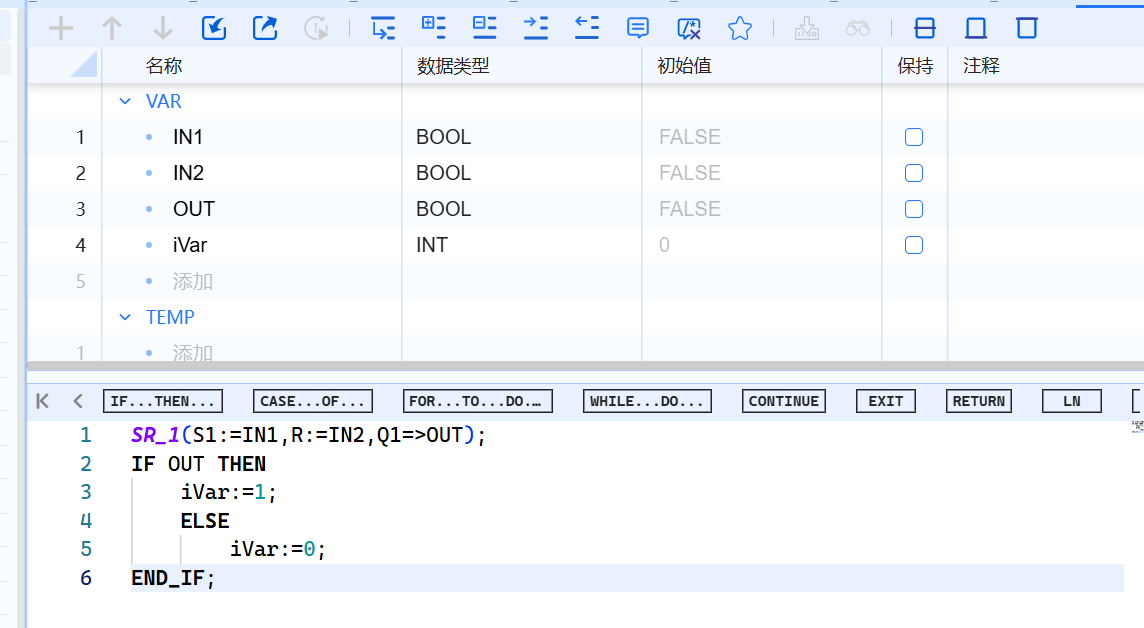
- Programming window components:
| Part | Meaning |
|---|---|
| Sidebar | User can set bookmarks and breakpoints in the sidebar |
| Line number | The line number is displayed to the left of the program code |
| Outline view | The corresponding code section will be highlighted in the outline view |
| Code area | In the code area, ST programs can be edited |
| Display of absolute operands | The symbolic operands assigned to absolute addresses are listed in this table |
-
For basic ST programming instructions, please refer to Basic Instructions-ST
-
For ST programming system library instructions, please refer to System Library Description