7.15.2 TSEND_C
TSEND_C (Establish TCP connection and send data)
Function
-
Supports duplex mode, PLC can send data as both the active connection party (client) and the passive connection party (server)
-
TSEND_C system library is used to establish TCP connections asynchronously and send data. (Establishing a TCP connection and sending data), the functions implemented include the following three parts:
-
Set up and establish communication connection
- After the user configures the correct IP address and port in the connect block, set the CONT parameter to true to enable the connection function and establish a communication connection.
-
Send data over existing communication connection
- After the connection is successfully established, the parameter REQ executes a send data request when it detects the rising edge. Users need to bind the data variables to be sent in the DATA block and specify the length to be sent, if the length is not specified, i.e., LEN = 0, i.e., the DATA will be sent in full by default
- If DATA is STRING type, when LEN = 0, it will send 82 bytes of data by default (the default size of String type variable is 82 bytes.)
- If DATA is UDT type, when 0 < LEN < DATA size, then the specified length of data will be sent according to the value of LEN
- The parameter REQ will execute a request to send data when it detects a rising edge, and in the case of a normal connection, it will ensure that the data of the specified length will be sent completely before the next sending, and if it is currently in the process of sending, and REQ detects a rising edge, it will not trigger a new sending action at this time.
- If the connection is disconnected during the sending process, the buffer will be emptied of the current number of bytes that have been sent, waiting for the connection to be restored, and then the rising edge needs to be recognized again before new data can be sent again.
-
Terminate or reset communication connection
- If the parameter CONT is set from true to false, the TDISCON function block will be used to terminate the communication connection
- When the connection is successfully established, the parameter COM_RST can be set to true to reset the current connection; if the current connection has not been established or CONT is set to false, COM_RST will not reset the connection when set to true
-
Instruction TSEND_C internally uses communication instructions "TCON", "TSEND", "T_RESET" and "TDISCON"
LDGraph
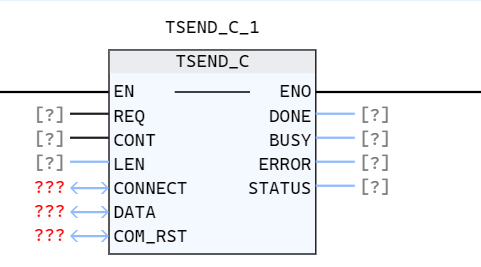
Parameter description
| Interface Variables | Declaration | Type | Description |
|---|---|---|---|
| REQ | Input | BOOL | Start sending job on rising edge |
| CONT | Input | BOOL | Controlling communication connection: 0: Disconnect communication connection 1: Establish and maintain communication connection |
| LEN | Input | UDINT | The number of bytes of data to be sent If LEN is equal to 0, all data in the Data area will be sent by default If LEN is not equal to 0, it will be sent according to the size of LEN , if the length of LEN is greater than 65535 or greater than the size of DATA, an error will be reported |
| CONNECT | InOut | TCP_ConnectConfig | A function block instance for configuring connection parameters. For details, refer to TCP_Connectconfig |
| DATA | InOut | ANY_TYPE | Data to be sent, ANY_TYPE type, supports basic types, String and UDT |
| COM_RST | InOut | BOOL | Reset connection parameters, if true, reset the existing connection, it will take effect if and only if the connection is successful |
| DONE | Output | BOOL | State parameter with the following possible values: 0: The sending job has not been started or is still in progress; 1: The sending job has been successfully executed This status will only Display a period |
| BUSY | Output | BOOL | State parameter with the following possible values: 0: The sending job has not been started or has been completed; 1: The sending job has not been completed. Unable to start new send job |
| ERROR | Output | BOOL | State parameter with the following possible values: 0: No error; 1: Error when establishing connection, transmitting data or terminating the connection |
| STATUS | Output | WORD | The status of the current function execution process. When ERROR=1, the cause of the current error can be determined based on the value of STATUS |
-
Use the BUSY, DONE, ERROR and STATUS parameters to check the status of the job. Parameter BUSY indicates that the sending function is being executed
-
Use the DONE parameter to check whether the sending task has been executed successfully
- If "ERROR" is 1, it means an error occurred during connection/disconnection/reset/sending.
- Error information is output through parameter STATUS
-
Among them, Done and Busy will not be set during the connection establishment process.
- The following table lists the relationship between parameters BUSY, DONE and ERROR
| BUSY | DONE | ERROR | Description |
|---|---|---|---|
| 1 | 0 | 0 | Sending job is being processed |
| 0 | 1 | 0 | Sending job completed successfully, will remain for one period |
| 0 | 0 | 1 | The job ended due to an error. The cause of the error is output via the parameter STATUS |
| 0 | 0 | 0 | No new jobs assigned |
Status code description
| STATUS(WORD 16#) | Description |
|---|---|
| 0000 | Uncalled |
| 0001 | Currently creating socket |
| 7000 | No task is activated, REQ detects rising edge, but CONT is false |
| 7001 | Socket created successfully |
| 7002 | Establishing communication connection |
| 7003 | Communication establishment is closing |
| 7004 | Connection successfully established |
| 7005 | Sending data |
| 7007 | Active disconnection |
| 7009 | Data sent successfully |
| 8000 | Resetting connection |
| The following are exception status codes | Description |
|---|---|
| 8080 | Failed to create socket, insufficient system socket resources |
| 8081 | The IP address is incorrect for the following reasons: The IP address corresponding to LocalAddress does not exist, i.e., LocalAddress does not match the IP of all the PLC network ports; The PLC network corresponding to the currently used LocalAddress The port protocol is not Ethernet protocol; The current LocalAddress value is 0.0.0.0; |
| 8082 | Setting IP address and port number reusability errors |
| 8083 | bind address, port number and socket failed, mainly because the front port has been occupied |
| 8084 | Failed to add server socket to EPOLL listening queue |
| 8086 | Failed to receive new connection |
| 8087 | Failed to remove the Epoll event corresponding to the client |
| 80A0 | Client failed to connect to server |
| 80A1 | The connection has not yet been established. When Cont is set to TRUE and REQ receives a rising edge, the user has activated the sending function but the specified connection has not been established at this time, error 80A1 |
| 80A2 | Active disconnection failed |
| 80A3 | Reset connection failed |
| 80A4 | Data block is empty |
| 80A5 | 80A5 appears for the following three reasons: parameter LEN is greater than 65536 The value of LEN is greater than the size of the data block LEN is 0 and the size of the data block is greater than 65536 |
| 80A7 | Error in obtaining TCP corresponding send/receive buffer BUF |
| 80A8 | The sending buffer corresponding to the socket is full |
| 80A9 | Failed to send data |
| 80AB | The keep-alive mechanism recognizes that the physical layer network is disconnected and only retains one cycle |
| 80AC | Asynchronous function enqueue failed |
| 80C3 | The connection corresponding to the current TConnectConfig is already used by other TSEND_C blocks |
| 80C5 | During the process of sending data, the peer actively disconnected |
Notes
- Only when req receives a rising edge can it trigger a sending action. The sending data function will only trigger a new sending action and send new data after all the sendings are successful and req recognizes a new rising edge;
- During the sending/receiving process, modifying the size of the DATA block may cause inconsistency in the sent and received data. Ensure that the current sending and receiving actions are stopped before modifying the DATA size; Or after modifying the DATA block size, it is found that The sending and receiving data is inconsistent. At this time, you can reset the connection to solve the problem
- When the current TSEND_C uses the TCP_Connectconfig_1 connection block to perform the sending action, if it is currently in the sending process and has not completed a sending action, delete the TSEND_C function block, and then create a new TSEND_C_2 that also uses the TCP_ConnectConfig_1 connection. Connect the block to perform the sending action. At this time, an error 0x80C3 will be reported. This is because the current connection block TCP_ConnectConfig_1 is still occupied by the previous TSEND_C function block and cannot be released. At this time, it is recommended to disconnect or reset the connection to return to normal; or avoid During the sending process, delete the TSEND_C instance.
- When TSEND_C is currently using the TCP_Connectconfig_1 connection block for sending action, if it is currently in the process of sending and has not yet completed a sending action, modify the initial value of TSEND_C in the GVS table and carry out an incremental download, and then still use the sending block TSEND_C to carry out the receiving action. In this case, the error 0x80C3 will be reported, because modifying the initial value of the incremental download is equivalent to creating a new TSEND_C sending block.In this case, it is recommended to disconnect or reset the connection to restore normal; or avoid modifying the initial value of the TSEND_C instance during the sending process.
- When using UDT as a data block to send, please note that UDT is 4-byte aligned by default. Part of the data in the UDT that is less than four bytes may be padded with 0s during the compilation stage until it meets the 4-byte aligned arrangement; If you use TCP communication block to communicate within Baosky PLC, you don’t need to worry about UDT-4byte alignment. If you communicate with L2 or third-party PLC manufacturers, it is recommended to pay attention to this issue.
- Baosky PLC data storage is based on little-endian storage. When using TCP function blocks to send data, it is also sent in little-endian byte order. If communicating with third-party PLC manufacturers and retrograde networks, It is necessary to perform big-endian conversion according to the actual scenario.
- When multiple TSEND_C function blocks use the same TCP_ConnectConfig connection block, only one TSEND_C function block can send data at the same time. At this time, only one sending function block can work normally, and the others will report error 80C3; In this scenario Below, avoid using TASKs of different priorities to bind different TSEND_C function blocks (these TSEND_C function blocks use a TCP_ConnectConfig connection block), otherwise the data sent will be disordered. If the above TSEND_C function block does not use the same TCP_ConnectConfig connection block, binding it to TASKs of different priorities will not be affected.
Example
- LD example is shown in the following animation:
- ST example is shown in the following code:
TSEND_C_1(
    REQ:=bVar,
    CONT:=Switch,
    LEN:=0,
    CONNECT:=TCP_CONNECTCONFIG_1,
    DATA:=iVar,
    COM_RST:=RESET,
    DONE=>OUT,
    BUSY=>OUT2,
    ERROR=>OUT3,
    STATUS=>OUT4
);
bVar:=not bvar;
iVar:= iVar+1;