7.15.9 TRCV
Function
- TRCV system library is used to receive specified data asynchronously
- No connection function is provided
Set up and establish communication connections
-
After the connection is successfully established, the user gives req a rising edge, which will trigger a receive data function;
-
The data receiving function TRCV only works when the communication connection has been successfully established;
-
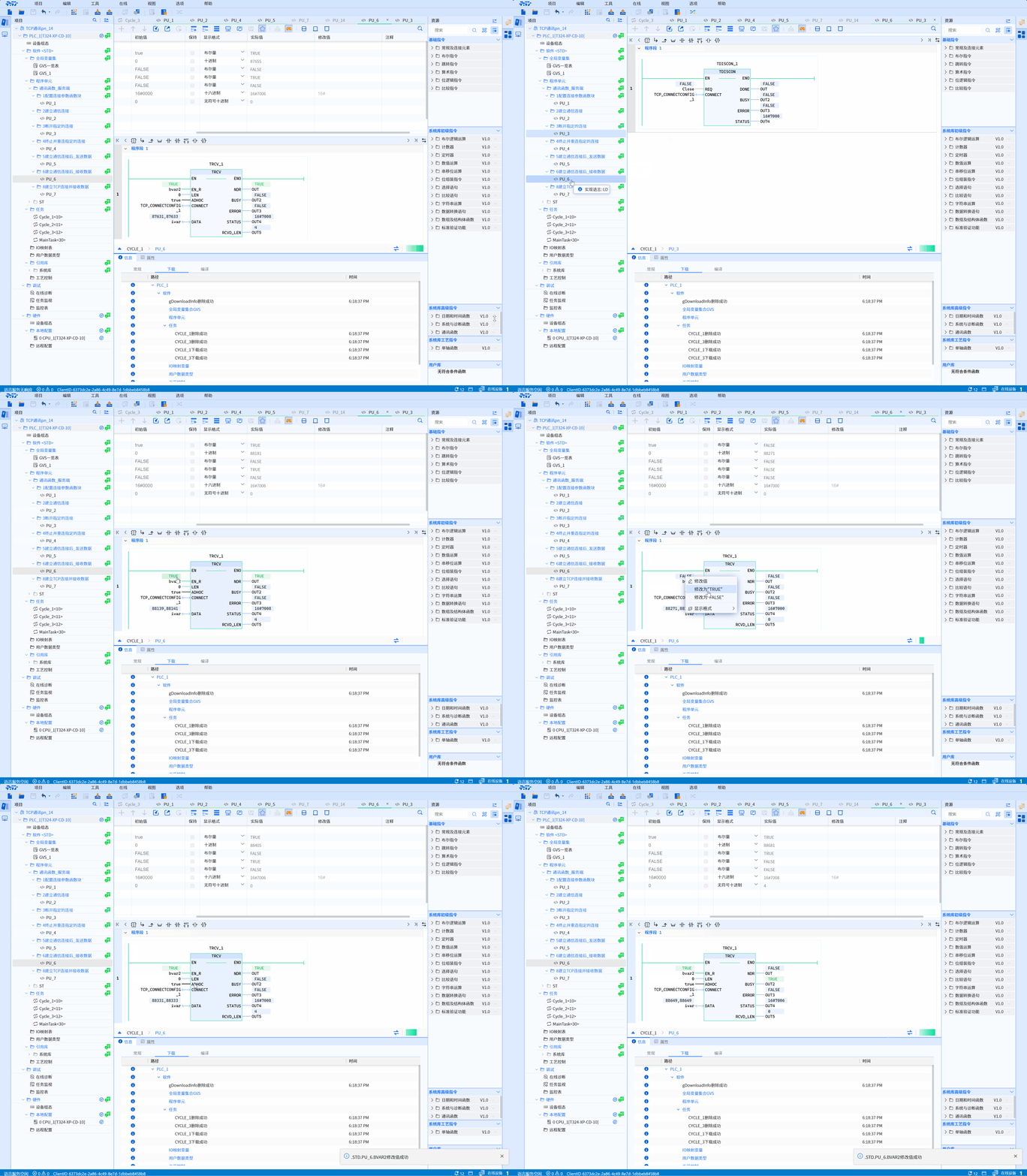
The correct reception process requires setting the EN_R pin to true first. You can see that the status word in the TRCV block changes from 0x7004 (connection has been established) → 0x7006 (data is being received) → 0x7008 (data is received successfully), indicating that the data has been sent successfully;
-
If there is no error in the receiving process and the data of the specified length is not received, BUSY will remain true at this time and the status code is 0x7006;
-
After setting the EN_R pin to true, if the connection is not established at this time, error = true will be displayed and the status code is 0x80A1 (the connection has not been established yet)
LD graphics
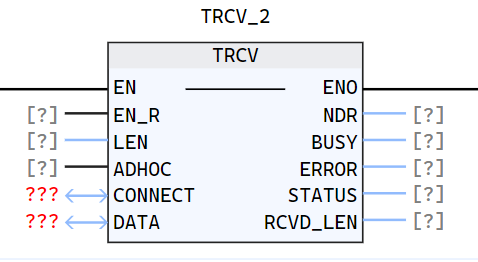
Parameter description
| Interface Variables | Declaration | Data Type | Description |
|---|---|---|---|
| EN_R | Input | BOOL | EN_R = True, enable receiving function |
| LEN | Input | UDINT | Receive data with length LEN If it is 0, receive data of DATA size If it is greater than 65535 or greater than the size of DATA, an error will be reported directly The receiving length also depends on On whether to turn on ADHOC mode |
| ADHOC | Input | BOOL | Receiving mode: 0: Indicates that the static receiving mode is enabled. Only when data of the specified size is received, done will be set to true and maintained for a period 1: Indicates that the dynamic receiving mode is enabled. As long as data is received, even 1 byte, done will be set to true and maintained for a period |
| CONNECT | InOut | TCP_ConnectConfig | Function block instance to configure connection parameters, refer to TCP_Connectconfig |
| DATA | InOut | ANY_TYPE | Data block to store received data |
| DONE | Output | BOOL | State parameter with the following possible values: 0: Receiving data has not yet started or is still in progress 1: Receiving data has been successfully executed. This status will only show for one cycle |
| BUSY | Output | BOOL | State parameter with the following possible values: 0: Receiving data has not yet started or has been completed 1: Receiving data has not yet been completed |
| ERROR | Output | BOOL | State parameter with the following possible values: 0: No error 1: Error in receiving data |
| STATUS | Output | WORD | The status of the current function execution process |
| RCVD_LEN | Output | UDINT | Actually received data length, only when done = true, it will be updated once and maintained for one cycle |
Status code description
| STATUS(WORD 16#) | Description |
|---|---|
| 0000 | Uncalled |
| 7006 | Turn on the receiving function and receive data |
| 7008 | Specified data successfully received |
| The following are exception status codes | Description |
|---|---|
| 80A1 | The specified connection has not been established yet, used when the sending and receiving functions are activated, but the connection has not yet been established |
| 80A4 | Data block is empty |
| 80A5 | 80A5 appears for the following three reasons: The parameter LEN is greater than 65536; The value of LEN is greater than the size of the data block; LEN is 0 and the size of the data block is greater than 65536 |
| 80A7 | Failed to obtain send buffer |
| 80AA | Sending failed |
| 80AC | Asynchronous function queue entry failed |
| 80C3 | The connection corresponding to the current TConnectConfig is already used by other TRCV blocks |
| 80C5 | During the process of sending/receiving data, the peer actively disconnected |
Example
- LD example is shown in the following animation:
- ST example is shown in the following code:
TRCV_1(
    EN_R:=bVar,
    LEN:=0,
    ADHOC:=true,
    CONNECT:=TCP_CONNECTCONFIG_1,
    DATA:=iVar,
    NDR=>OUT,
    BUSY=>OUT2,
    ERROR=>OUT3,
    STATUS=>OUT4,
    RCVD_LEN=>OUT5
);