6.1 Compile
- The role of compilation is to convert programs written in high-level languages into binary codes that are executable by the device. Through compilation, programmers can program in a more understandable high-level language without directly writing complex machine language codes; the compilation process includes lexical analysis, syntax analysis, semantic analysis, intermediate code generation, code optimization and target code generation stages. These stages together ensure the correctness and efficiency of the program.
6.1.1 Introduction to compilation
- User programs must be compiled before they can be executed in the CPU. The program needs to be recompiled every time a change is made
- Compilation can be canceled, but undo/redo cannot be done. If the compilation process is canceled, an alarm (yellow) is displayed in the Inspector window
6.1.1.1 Compilation method (entrance)
-
Menu bar-->"Edit" menu-->Compile (compile content based on the selected "Project Tree Node") [Increment]
-
Toolbar-->Cancel Compilation / Compile (compile content based on the selected "Project Tree Node") [Increment]
-
Project tree right-click menu (compile content based on the selected "project tree node") [increment / full amount]
- PLC_1 (compile all software + hardware)
- Software and software sub-nodes (compile all software)
- Hardware and hardware subnodes (compile all hardware)
6.1.2 Incremental Compilation
6.1.2.1 Introduction
- Incremental compilation is relative to full compilation. It means that when a part of the source program is changed, the recompilation work is limited to the modified part and the content of the related parts, without compiling the entire code.
6.1.2.2 Introduction to incremental compilation
- Software incremental compilation, that is, compiling all involved modified parts of the user software
-
In addition to clearly modifying the module, it is necessary to check the calling relationship and dependency relationship and compile the relevant PU together
-
Changing the interface of the called block or the user-defined data types (UDTs) that have been used can lead to inconsistencies in the interface between the calling and called blocks; or between the UDT data types and the variables that use them
-
In order to avoid such inconsistencies in user programs, before each compilation, check the dependencies of the relevant modified modules, and then compile all related modules
-
If you start downloading immediately instead of compiling first, the system will first perform incremental compilation, and then download after successful compilation
6.1.2.3 Incremental compilation operation
- Incremental compilation: Compile all modified GVS, PU, UDT, TASK, IO mapping table, etc. under the APPLICATION (software) of the device (PLC), regardless of the software object selected in the project tree.
Operation steps:
To compile all modified blocks in the "Program Unit" directory in the project tree
-
Select PLC or software and any node under software in the project tree
-
Select "Compile > Software (incremental compilation) from the right-click shortcut; or select the "Compile" command in the project menu edit box or toolbar
If the syntax check and compilation dependency check are successful, the compilation block code is generated The message displayed in "Information > Compilation" of the inspector window will report whether the compilation was successful or not.
- Click the "jump arrow" of the compiled information, and the cursor can jump to the corresponding information location
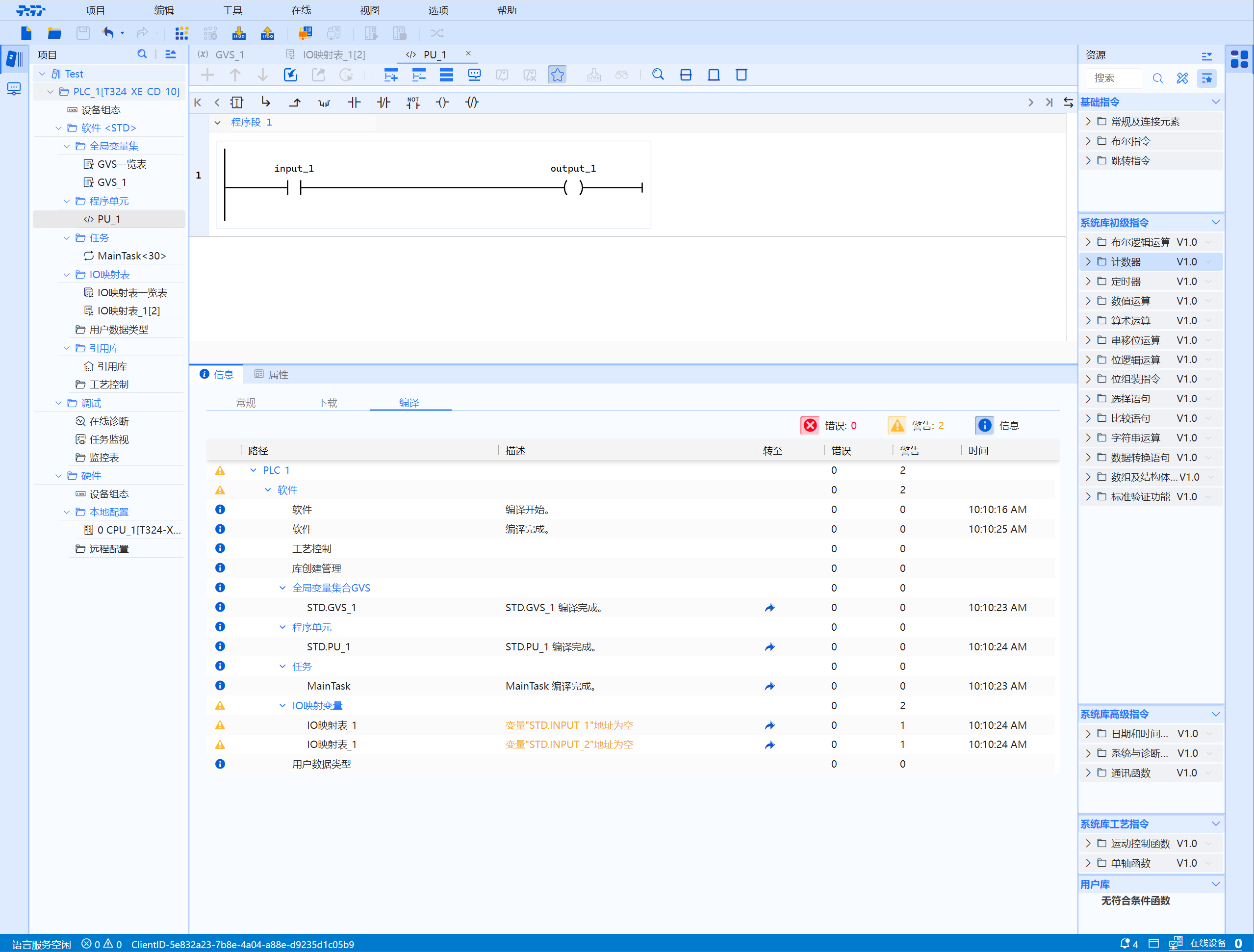
- When the UDT, FC or FB interface is modified, the modules involved in retrieving related instances based on dependencies also need to be recompiled. For details, see: Incremental compilation-->Introduction to incremental compilation
6.1.3 Full Compilation
6.1.3.1 Full Compilation
- Full compilation refers to the complete compilation, linking, testing and packaging of all components of the entire software project or system. This process is to ensure that all source code and resources are compiled and linked correctly, producing one or more executable files or library files for final deployment to the target environment.
6.1.3.2 Full compilation operation
- Rebuild and compile all software: Refers to first clearing all software compilation products of the device (PLC), and then compiling all GVS, PU, UDT, TASK, IO mapping tables, etc. under APPLICATION (software), and project tree has nothing to do with software object selection
Operation steps:
To compile all blocks in the "Program Unit" directory in the project tree
-
Select PLC or "Program Unit" in the project tree
-
Select "Compile > Software (Rebuild All)" in the shortcut menu
If the syntax check and dependency compilation check are successfully performed, the compilation block code is generated The message displayed in "Information > Compilation" of the inspector window will report whether the compilation was successful or not.