4.4 Add Program Unit
4.4.1 Overview
- This section can be used in conjunction with Programming Guide-->Program Structure-->Program Unit
Jump link--> Program Unit
-
PU, program unit (ProgramUnit, abbreviated "PU"): including program (PRG), function block (FB) and function (FC)
- PRG, program (Program, abbreviation "PRG")
- FB, function block (Function Block, abbreviation "FB")
- FC, function function, abbreviated as "Function" (Function, abbreviated as "FC")
-
programming language
-
1.ST: Use text programming to write programs (PRG, FB, FC)
- Advantages:
- ST language code can be written in the program
- The text editor has self-checking and shortcut code automatic filling functions.
- The ST code can be saved even if it is not finished
- Code icons are saved as ST style
- Advantages:
-
2.LD: Use ladder diagram to write code (PRG, FB, FC)
- Advantages:
- The program segment can add the LD language code within the resource
- The LD code can be saved even if it is not finished
- The icon of the code is saved as LD style
- Advantages:
-
3.SFC: Provides a means to connect a set of steps and transitions to each other through directed connections to write programs in the format of a sequence program. Each step is associated with a set of actions, and each transition is associated with a transition condition
-
4.4.1.1 PU structure
A complete PU consists of the following three parts:
- PU type and naming
- Variable declaration part
- Code instruction part (PU Body)
4.4.1.2 Add subdirectory under the PU
- In order to manage the PU more conveniently, user can add a directory under the PU to facilitate the management of the PU
Operation steps: Project-->PU-->Right mouse button-->Add Directory
- Then user can add PU in subdirectories
4.4.2 Add PU
Operation steps:
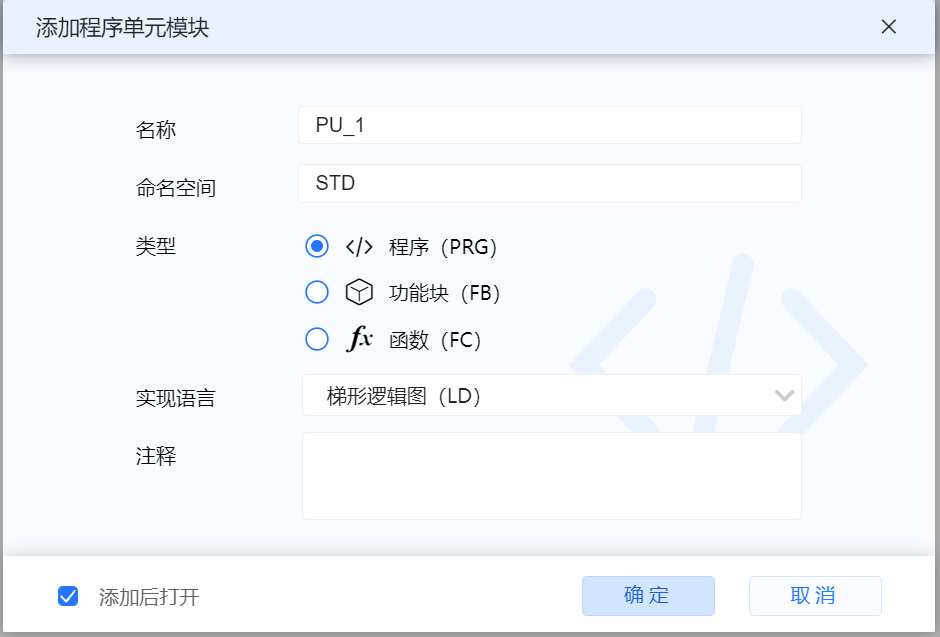
- In the project tree "PLC Software", the user can right-click "PU" and select "Add PU", and then the pop-up window can select PRG, FB or FC, and the corresponding programming language. After adding, user can view the corresponding attributes in the PU brackets in the project device tree on the left
4.4.3 PRG
PRG definition
- In the design programming specification, PRG can only be called uniquely in a task. PRG cannot be called by PU (PRG, FB, FC). FB, FC can be called multiple times by FB, FC or PRG
4.4.3.1 PRG_ST (Structured Text)
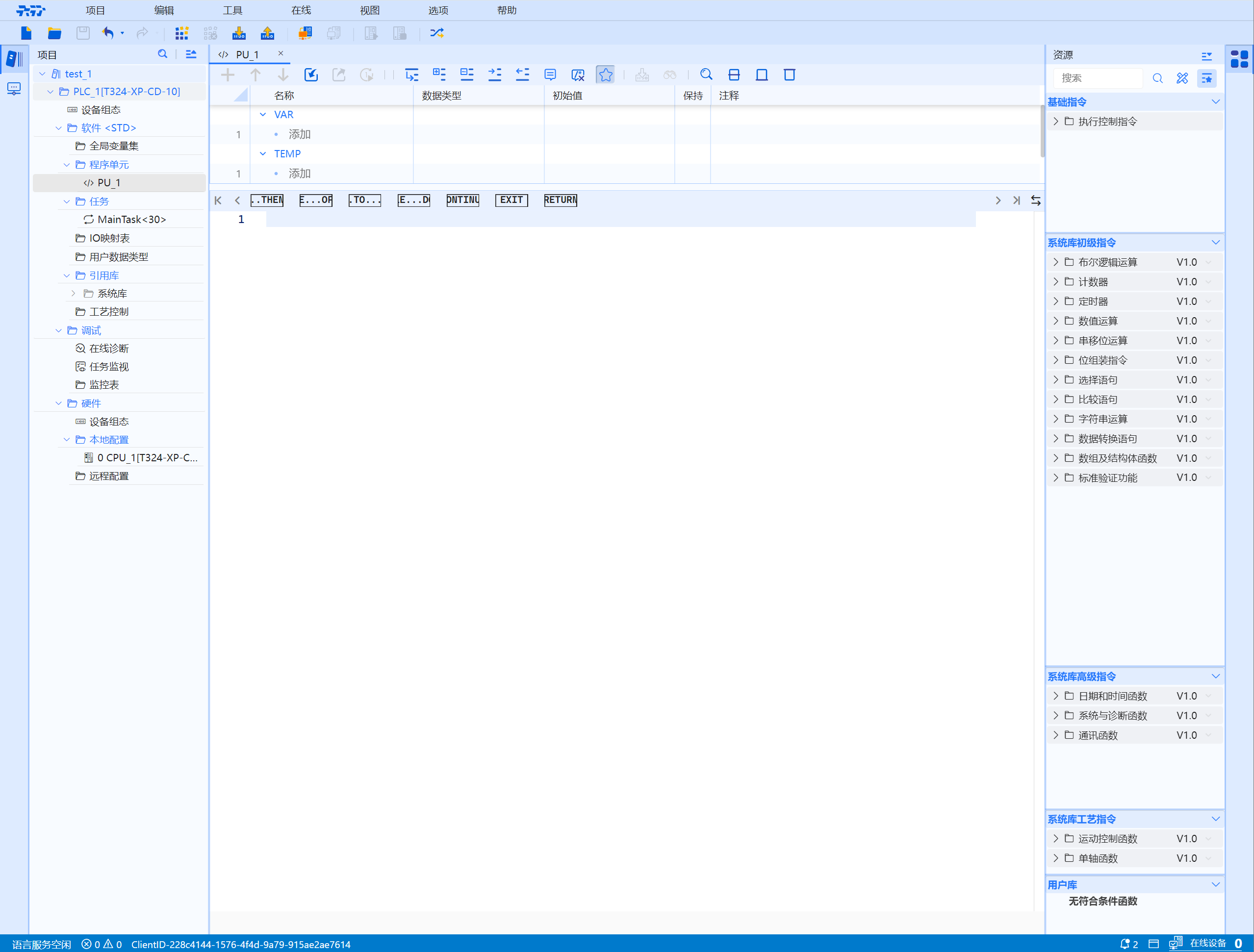
(a). Declaration area
-
VAR (variable):
-
TEMP: Temporary variable used to temporarily store intermediate results inside the function. It does not occupy the background data block storage space. The temporary variable takes effect when the function block is called. After the function execution is completed, the temporary variable area is released
-
LOCAL CONSTANT: After declaring the symbolic name of the constant, the symbol can be used instead of the constant in the program, which makes the program more readable and easier to maintain. Symbolic constants consist of three elements: name, data type and constant value. Local constants only apply within the block
- Fill in "data name", "data type", "define initial value" (if it can be defined), and check whether to "keep"
(b). Secondary toolbar
For the specific functions of the buttons, please refer to the User Manual--Overview--Introduction to the Toolbar Area Interface Buttons
Jump link--> Button Function
4.4.3.2 PRG_LD (ladder logic diagram)
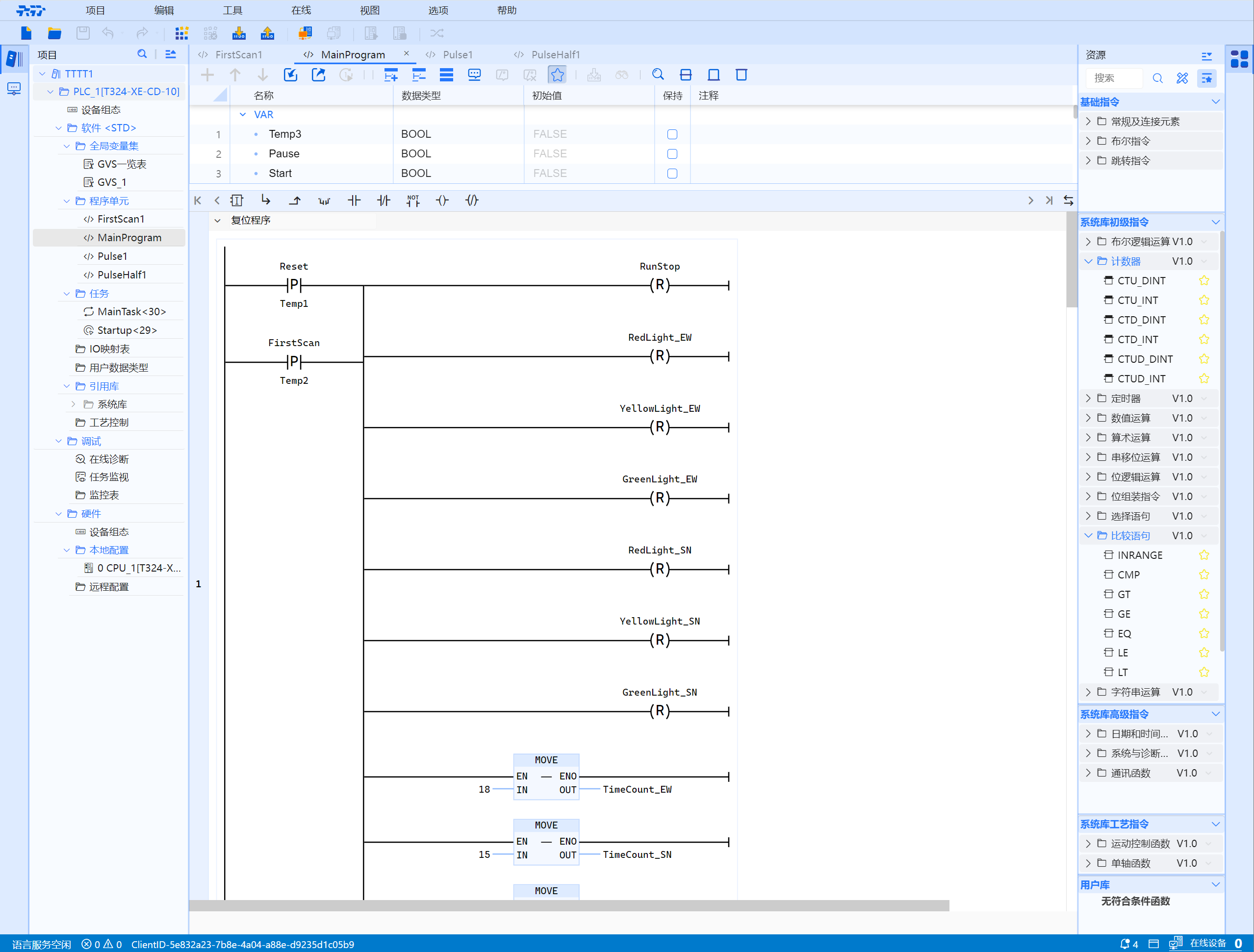
(a). Declaration area
- For data definition, please refer to Program-->ST-->Programming page
Jump link--> ST_Programming Page
(b). Secondary toolbar
For the specific functions of the buttons, please refer to the User Manual--Overview--Introduction to the Toolbar Area Interface Buttons
Jump link--> Button Function
4.4.4 FB
FB definition
- FB converts repeatedly used part of the program block into a universal component, which can be called by any programming language in the program
4.4.4.1 FB_ST (Structured Text)
(a). Declaration area
- INPUT: Input parameters, user program data is transferred to the function block when the function block is called. Actual parameters can be real numbers
- INOUT: Input/output parameters. When the function block is called, the function block reads its value and performs the operation. After execution, the result is returned. The actual parameter cannot be a constant
- OUTPUT: Output parameters. When the function block is called, the execution result of the function block is transferred to the user program. The actual parameters cannot be constants
- STATIC: static variable, does not participate in parameter transfer, used to store intermediate process values
- TEMP: Temporary variable used to temporarily store intermediate results inside the function. It does not occupy the background data block storage space. The temporary variable takes effect when the function block is called. After the function execution is completed, the temporary variable area is released
- LOCAL CONSTANT: After declaring the symbolic name of the constant, the symbol can be used instead of the constant in the program, which makes the program more readable and easier to maintain. Symbolic constants consist of three elements: name, data type and constant value. Local constants only apply within the block
- Fill in "data name", "data type", "define initial value" (if it can be defined), and check whether to "keep"
(b). Secondary toolbar
For the specific functions of the buttons, please refer to the User Manual--Overview--Introduction to the Toolbar Area Interface Buttons
Jump link--> Button Function
4.4.4.2 FB_LD (ladder logic diagram)
(a). Declaration area
- For data definition, please refer to Function Block-->ST-->Programming Page
Jump link--> FB_Programming Page
(b). Secondary toolbar
For the specific functions of the buttons, please refer to the User Manual--Overview--Introduction to the Toolbar Area Interface Buttons
Jump link--> Button Function
4.4.4.3 FB_SFC (Sequential Function Chart)
For specific instructions, please refer to Programming Guide-Programming Language-SFC Language
4.4.4.3.1 Declaration Area
- INPUT: Input parameters, user program data is transferred to the function block when the function block is called. Actual parameters can be real numbers
- INOUT: Input/output parameters. When the function block is called, the function block reads its value and performs the operation. After execution, the result is returned. The actual parameter cannot be a constant
- OUTPUT: Output parameters. When the function block is called, the execution result of the function block is transferred to the user program. The actual parameters cannot be constants
- STATIC: Static variable, does not participate in parameter transfer, used to store intermediate process values
- TEMP: Temporary variable used to temporarily store intermediate results inside the function. It does not occupy the background data block storage space. The temporary variable takes effect when the function block is called. After the function execution is completed, the temporary variable area is released
- LOCAL CONSTANT: Temporary variable used to temporarily store intermediate results inside the function. It does not occupy the background data block storage space. The temporary variable takes effect when the function block is called. After the function execution is completed, the temporary variable area is released
- Fill in "data name", "data type", "define initial value" (if it can be defined), and check whether to "keep"
4.4.5 FC
FC definition
- FC is a block of code without memory. Since there is no data memory in which the block parameter values can be stored. Therefore, when calling a function, all formal parameters must be assigned actual parameters
- Specifications related to functional functions
- Generally provides a temporary result, which may be a single data element or a multi-valued array or structure
- An output variable can be provided, which can be multi-valued
- The values of input and output variables and global variables can be changed
- Functions with results can be called within an expression or statement
- Functions without results should not be called within expressions
- Function FC can be called by function FC, function block FB, and program PRG
4.4.5.1 FC_ST (Structured Text)
(a). Declaration area
- WITH RETURN:
- INPUT: Input parameters, user program data is transferred to the function block when the function block is called. Actual parameters can be real numbers
- INOUT: Input/output parameters. When the function block is called, the function block reads its value and performs the operation. After execution, the result is returned. The actual parameter cannot be a constant
- OUTPUT: Output parameters. When the function block is called, the execution result of the function block is transferred to the user program. The actual parameters cannot be constants
- TEMP: Temporary variable used to temporarily store intermediate results inside the function. It does not occupy the background data block storage space. The temporary variable takes effect when the function block is called. After the function execution is completed, the temporary variable area is released
- LOCAL CONSTANT: Temporary variable used to temporarily store intermediate results inside the function. It does not occupy the background data block storage space. The temporary variable takes effect when the function block is called. After the function execution is completed, the temporary variable area is released
- Fill in "data name", "data type", "define initial value" (if it can be defined)
(b). Secondary toolbar
For the specific functions of the buttons, please refer to the User Manual--Overview--Introduction to the Toolbar Area Interface Buttons. Jump link--> Button Function
4.4.5.2 FC_LD (ladder logic diagram)
(a). Declaration area
- For data definition, please refer to Function-->ST-->Programming Page .Jump link--FC programming page
(b). Secondary toolbar
For the specific functions of the buttons, please refer to the User Manual--Overview--Introduction to the Toolbar Area Interface Buttons
Jump link--> Button Function
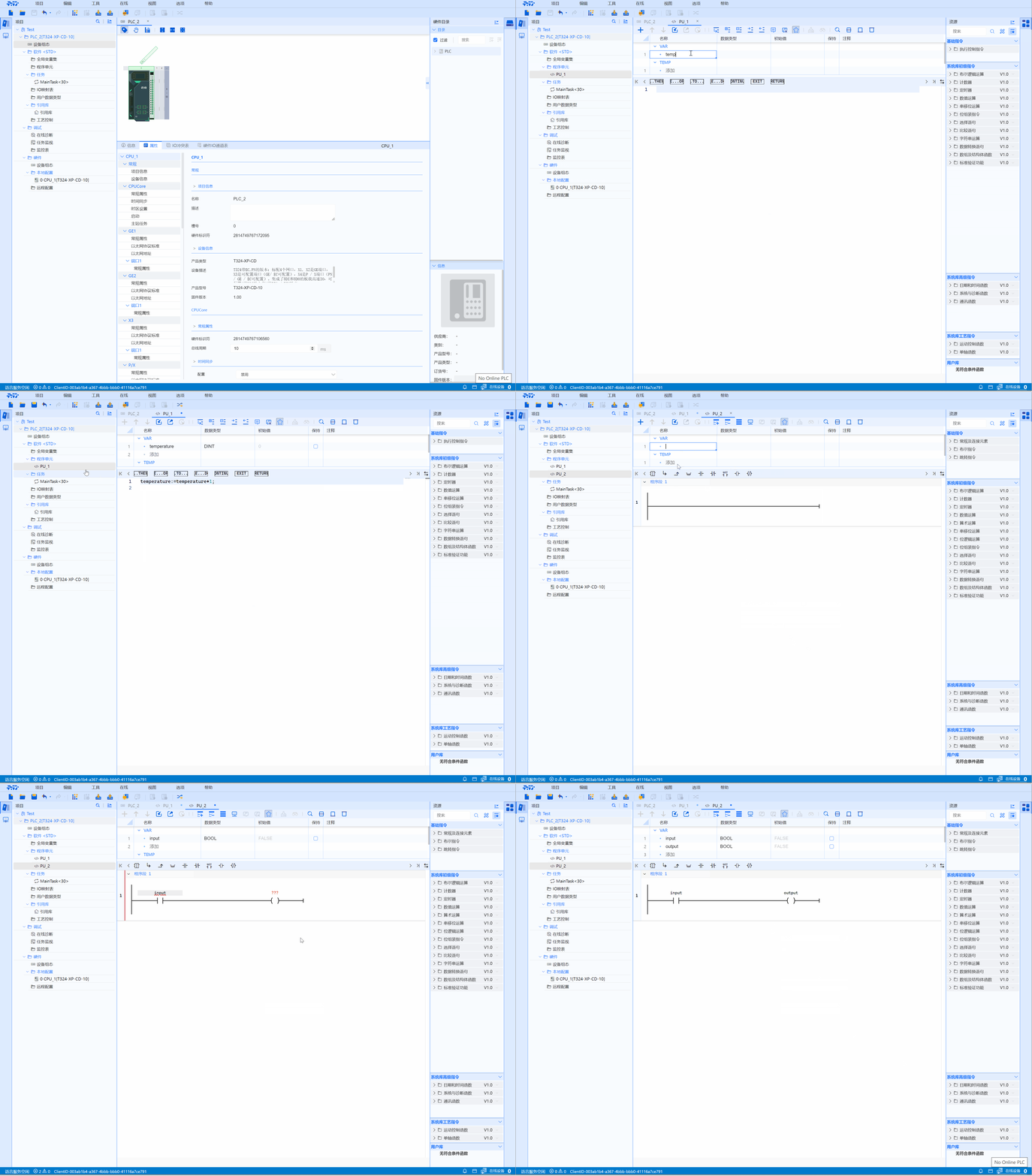
4.4.6 Add PU operation video
- Take program PRG as an example
4.4.7 LD/ST Variable Drag and Drop
- select the name cell to drag and drop, the content of the drag and drop is the variable name.
- Drag and drop other cells, the content of the drag and drop is not the cell text.
- cross-tab declaration area drag and drop to code area.
- cross-tab drag and drop and drag and drop from the declaration area to the code area are copy and paste.
- the same tab code area for drag and drop for cut and paste